Mobile shop stock software — kitna maal, kab se pada, sab saaf
ब्रांड पर क्लिक करो — सिर्फ़ उसी का स्टॉक। 60 दिन से पड़ा माल — तुरंत पता।
MobileOne shows your full stock on one screen — pieces and value on top, brand filters, IMEI wise list and aging. Old stock shows up early, so you can push it before the price drops.
Credit card nahi chahiye · Setup aur data import mein madad · Hindi / English
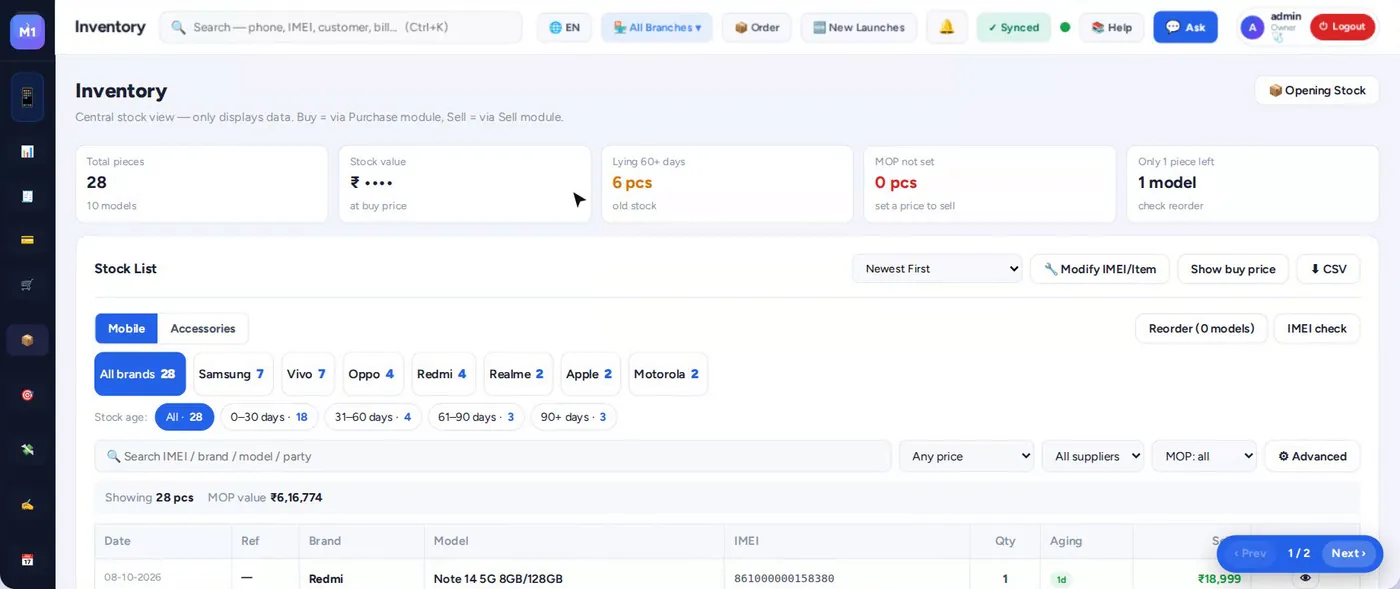
Stock mein paisa kahan phansta hai?
Stock management features
Ek nazar mein stock
Total pieces, value aur model count sabse upar.
Brand / model filter
Samsung, Vivo, Oppo… ek click mein sirf us brand ka stock.
Aging 0–30–60–90
Kitne din se pada — dead stock pehle hi alert.
Multi-branch
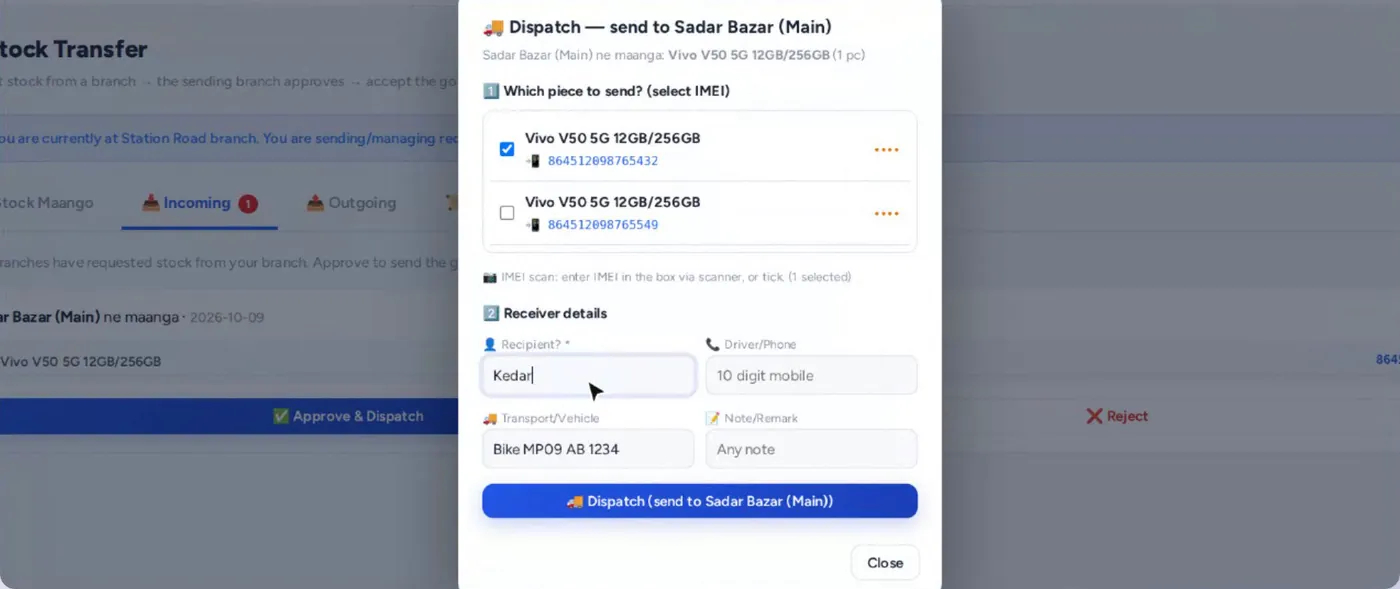
Sab branch ka stock ek jagah, IMEI ke saath transfer.
New launches + MOP
Naye model MOP ke saath list, ek click mein Item Master mein.
Stock audit
Surprise IMEI audit se stock ka sach.
Doosri branch se phone — 1 minute mein
Customer ko jo model chahiye wo is branch mein nahi? Doosri branch ka stock dekho, IMEI chuno aur request bhejo.
- IMEI tick karke request
- Doosri branch approve karke dispatch
- Receive par IMEI scan — stock mein ✓
Aging se dead stock pehle pakdo
Har phone kitne din se pada hai, wo stock list mein dikhta hai. 60–90 din wale phone par scheme ya offer laga kar nikaalo.
- 0–30, 31–60, 61–90, 90+ din filter
- Brand aur price range filter
- Excel / CSV export
Stock kaise set karein
Template
Opening stock Excel template download karo.
Import
IMEI, model, buy price ke saath upload.
Daily use
Purchase aur sale se stock apne aap update.
Review
Har hafte aging aur audit dekho.
Aksar poochhe jaane wale sawaal (FAQ)
Mobile shop ke liye inventory software kyun chahiye?
Mobile ka price jaldi girta hai. Kaunsa phone kitne din se pada hai ye pata ho to loss kam hota hai. IMEI wise stock se chori aur galti bhi pakdi jaati hai.
Kya multiple branch ka stock ek jagah dikhta hai?
Haan, sab branches ka stock ek jagah dikhta hai aur IMEI ke saath transfer hota hai.
Kya accessories ka stock bhi rakh sakte hain?
Haan, mobile ke saath accessories ka quantity wise stock bhi.
Kya stock Excel mein nikal sakte hain?
Haan, stock list CSV / Excel mein export hoti hai.
Aur dekho — MobileOne mobile shop software
Apna stock ek screen par dekho
14 din free trial. Setup, purana stock aur data import mein hum madad karte hain.